Design systems the way they happen.
Describe any system as commands, events and views. Fire one, then drag the timeline back: state is only ever a fold of what already happened.
Try it. Sample data, running in your browser.
user -> postTweet(content, media?) in UserTimeline(userId)on [user-authenticated(userId)] --[content.length > 280]--> [tweet-rejected] --[default]--> [ tweet-created { userId, content, media, createdAt: clock.wall() } ]user -> likeTweet(tweetId) in TweetFeed(tweetId)on [user-authenticated(userId), tweet-exists(tweetId)] --[alreadyLiked]--> [like-rejected] --[default]--> [ tweet-liked { userId, tweetId, likedAt: clock.wall() } ]user -> followUser(targetUserId) in UserFollows(userId)on [user-authenticated(userId), user-exists(targetUserId)] --[alreadyFollowing]--> [follow-rejected] --[default]--> [ user-followed { userId, targetUserId, followedAt: clock.wall() } ]Pick a command. The guard on each line decides which events it emits.
Event stream, sample traffic plus yours
- UserTimeline
- 0 tweets
- Likes
- 0
- Follows
- 0
Boxes show where.
Draw a rate limiter as services and it looks like nothing else you have drawn.
- Client
- API gateway
- Rate limiter
- Redis
Drawn as boxes
Events show what happened.
Write it as events and it looks like every other system.
- user-authenticated
{ userId } - request-logged
{ userId, resourceId } - rate-limit-reached
{ userId, retryAfter: 60s } - UserQuota(userId)A view folded from the events before it.
Written as events
Four slices, one timeline.
eventline maps one to one onto the four slice patterns of Event Modeling. Nobody drew this board, and it is not a picture: point at a box and the board traces its lineage. eventline-axi diagram eventmodel derived it from the 75 lines you are about to read.
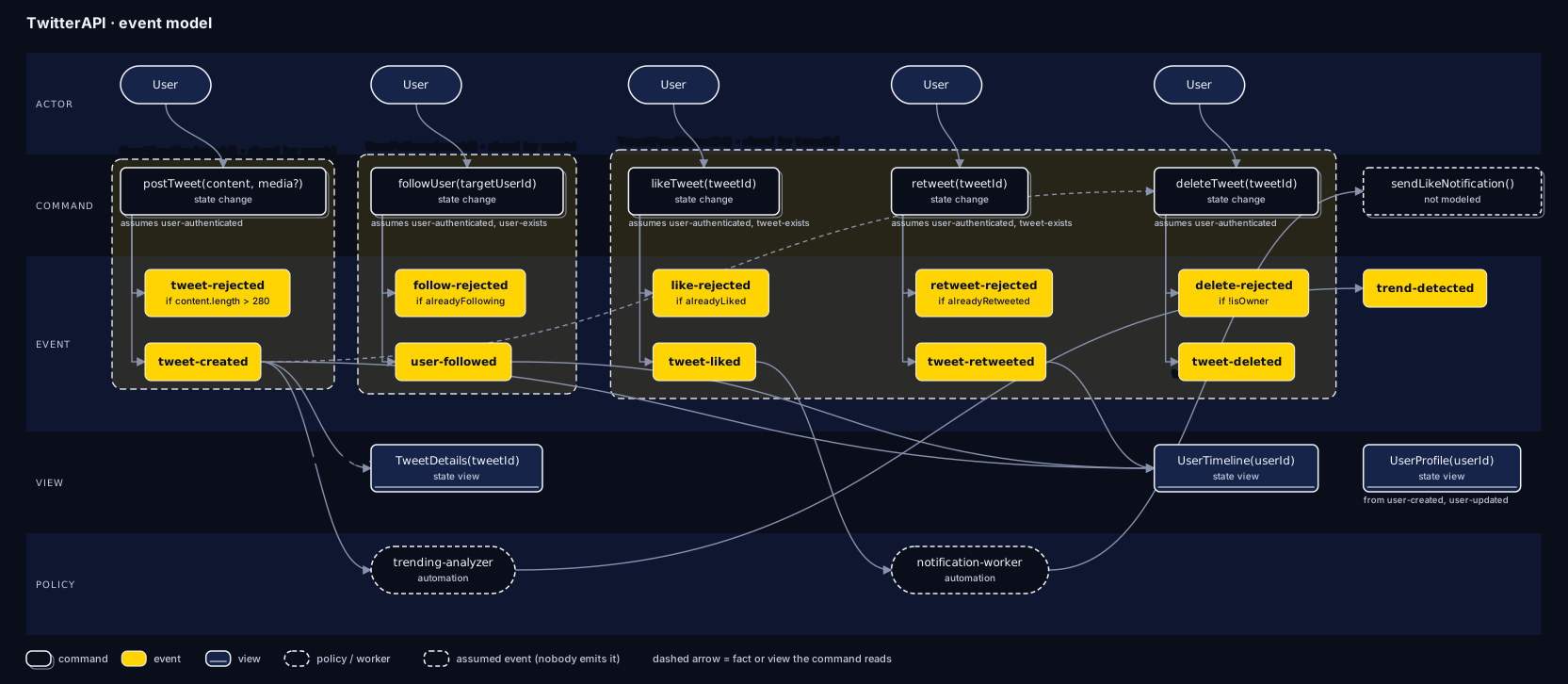
Point at any box to trace what feeds it and what reads it.
A whole API in 75 lines.
Every system is a series of events.
Commands decide. Events remember. Views answer.
- UserTimeline(u1)
- empty
- TweetDetails(t1)
- not created
- UserProfile(u2)
- 0 followers
Scroll to read the model. Each command runs as you reach it.
The same code the CLI runs
Now you write one.
Edit the model. eventline's own parser and renderer, bundled into this page, redraw the board on every keystroke. Nothing leaves your browser.
The board appears here. Scroll this section into view and it loads.
Questions, answered plainly.
Is eventline something I run in production?
No. It is a notation for describing a system, plus a CLI that reads your model files and reports on them. The demos on this page run a small stand-in for a real system, in your browser, so you can see what a model means.
Do I need to know Event Modeling first?
No. If you do, the mapping is direct: state change, state view, automation, and translation slices each have a line shape in eventline. If you do not, start with a command, the events it can produce, and a view that reads them.
How is this related to event storming?
Event storming is a workshop for finding out what happens in a domain. Event Modeling continues from there and turns the events into a design you can build from. eventline writes that design as text, so it can be reviewed and checked. Read how the three fit together.
What is a Dynamic Consistency Boundary?
It scopes a decision by a key, such as userId, instead of by an aggregate. A command reads only the events inside its boundary, so two users never contend for the same lock.
Can I use it in a system design interview?
That is what it was written for. Introduce it as a quick event model: write the commands, events, boundaries, and views before you draw infrastructure boxes. Interviewers get a precise picture of state changes, invariants, and concurrency in a few lines.
Do I need Kafka or event sourcing infrastructure?
No. eventline describes behavior, not infrastructure. Views name their cache or partition key as annotations, and you decide what stores the events.
What does the eventline-axi CLI do?
It parses a .dsl file and lists its actors, commands, events, views, boundaries, and policies. It traces dependencies, validates a model against the checklist, and exports the dependency graph as toon, JSON, or plain text.
Run it on a real model.
One line downloads the example and points the CLI at it. You get the whole model back.
curl -sO https://bytesbybrandon.github.io/eventline/twitter-pure.dsl && npx -y eventline-axi twitter-pure.dsl
Needs Node 18 or later. Swap diagrams in as the first argument to draw the model instead, or write your own in the playground.
$ npx -y eventline-axi twitter-pure.dsl

counts[6]:
  actors: 3
  commands: 5
  events: 16
  views: 3
  boundaries: 3
  policies: 2

system:
  name: TwitterAPI