Docs that explain themselves

Turn any source into a page that highlights as it explains.

npx -y living-docs-axi ingest notes.md --draft -o notes.json

Browse the gallery

Theme

Open this doc See its model

  1. It reads your source.

    Markdown, text, HTML, a URL or a PDF becomes an outline with section ids.

  2. It drafts the model, look and timeline.

    A draft picks a theme and an accent that clears contrast, and marks the sentences to highlight. Edit the JSON if you disagree.

  3. The engine renders one HTML file.

    Inline CSS and SVG, no network assets. Print, reduced motion and no script all show the final state.

  4. Cues play in step with the sentences.

    Highlight a sentence and its figure lights up. Numbers count and text types, always inside their own box.

  5. Pick a theme.

    The stage and the whole page follow it.
The same timeline, as a clip

MP4
For sharing. 2.5 to 3.7 MB for 20 seconds in our samples.
GIF
For READMEs, 720 pixels wide. About 12 MB for 20 seconds.
WebM
For the web, from the same frames.

Frames come from headless Chromium and ffmpeg, both optional. Two renders on one machine match frame for frame.

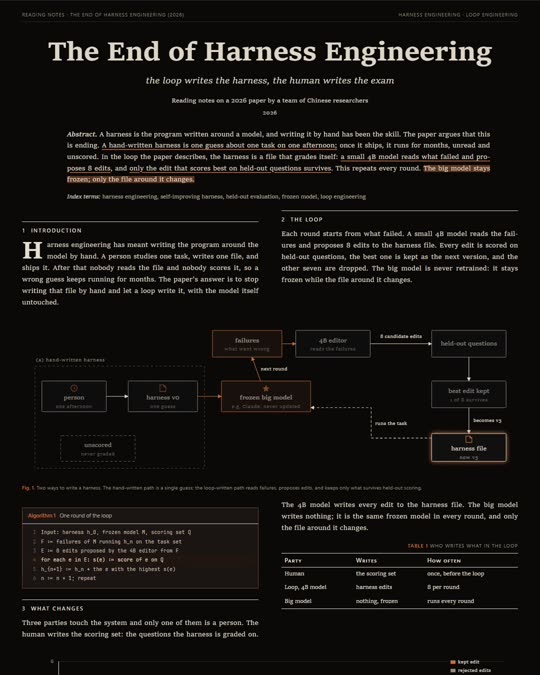
A frame from the exported MP4 of the reading notes sample: the abstract with highlighted sentences above the loop diagram, with one node lit.
Frame at nine seconds of the exported MP4.

From notes to a clip

living-docs-axi ingest notes.md --draft -o notes.json
living-docs-axi render notes.json -o notes.html
living-docs-axi render notes.json --format mp4 -o notes.mp4

Put npx -y in front of each, or install it once with npm i -g living-docs-axi. Video also needs playwright and ffmpeg; the timeline guide has the exact call.

Built for agents

The same core runs as an MCP server over stdio. Client setup.

{
  "mcpServers": {
    "living-docs": {
      "command": "npx",
      "args": ["-y", "-p", "living-docs-axi", "living-docs-mcp"]
    }
  }
}
living_docs_themes
List themes and what each suits
living_docs_schema
Block fields, or one block
living_docs_ingest
Outline a source, draft a model
living_docs_render
Validate, then write HTML or video
living_docs_preview
Serve built docs

What you can rely on

  • Self-contained

    No CDN, web fonts or remote images.

  • Deterministic output

    Same model and theme, same bytes.

  • Escaped by default

    Only http, https, mailto, hash and relative links survive.

  • Print ready

    Figures, tables and callouts stay unbroken.

Give it your notes

npx -y living-docs-axi ingest notes.md --draft -o notes.json